Features
A flight recorder, landing grader,
and debrief tool — in one.
Everything FLARE captures, scores, syncs, and shares. The desktop app on the left side, the customer portal on the right, in one continuous pipeline.
01 · TOUCHDOWN
Precision touchdown capture.
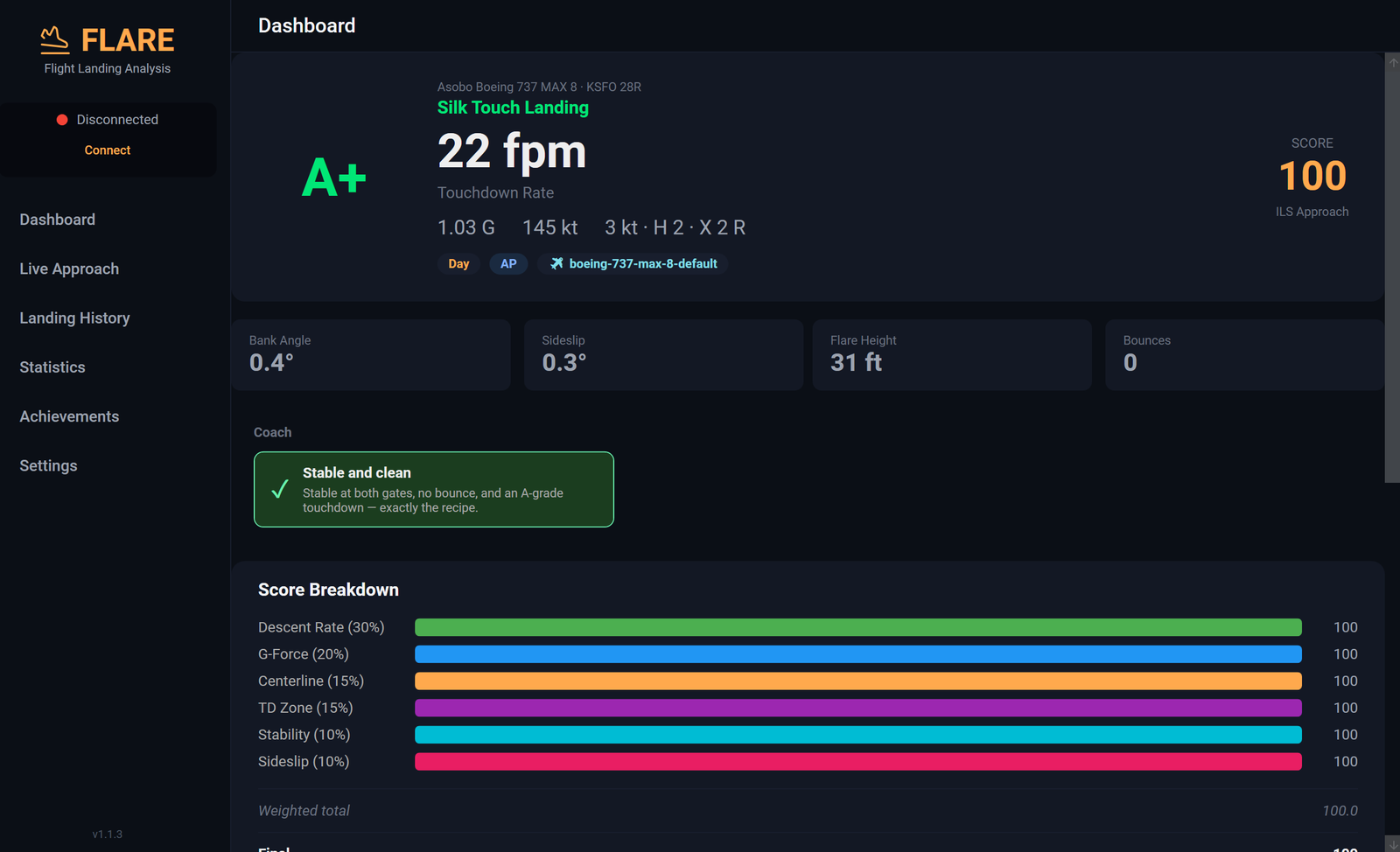
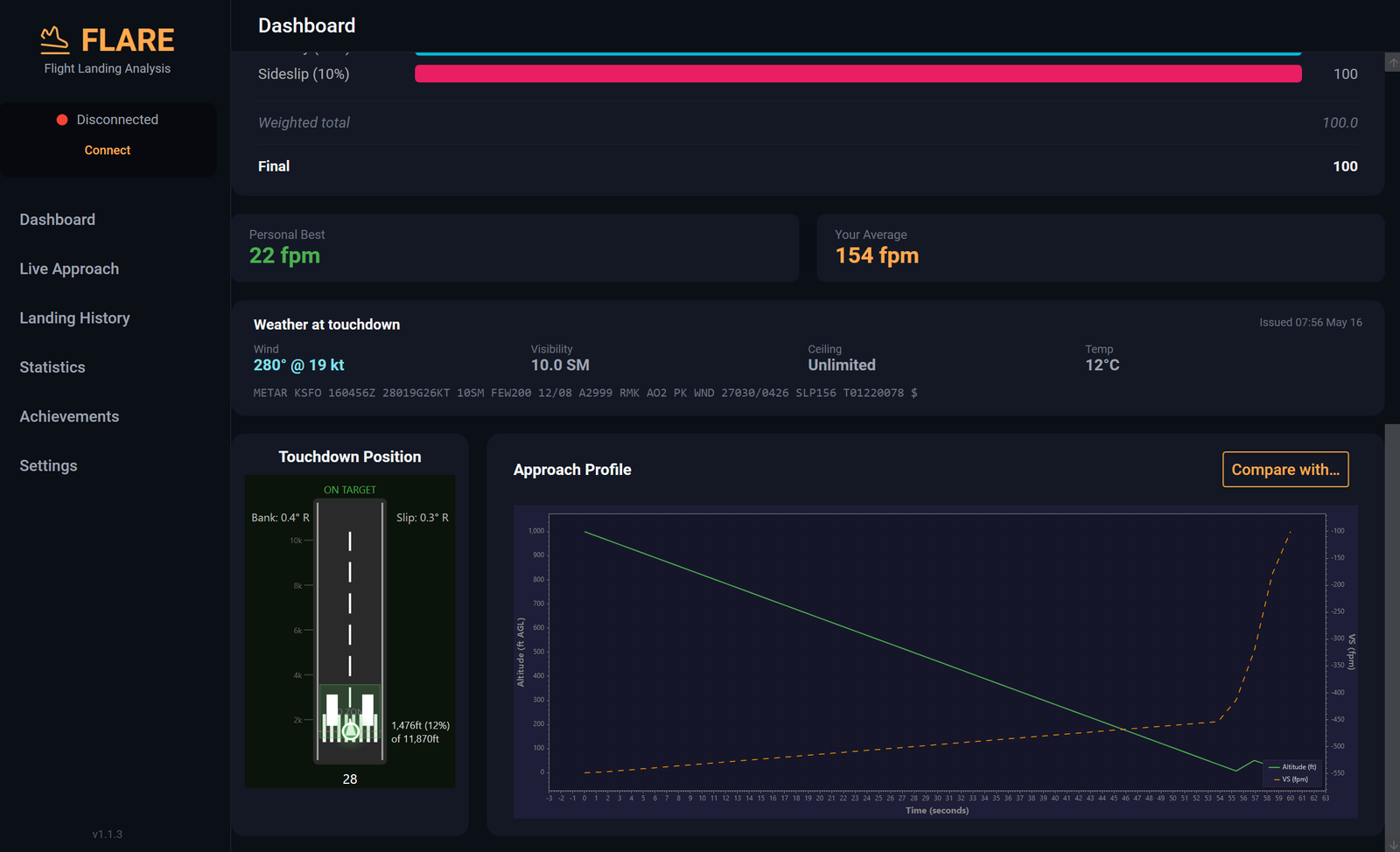
FLARE samples simulator state at high frequency and freezes the exact frame where main gear contacts the runway. Vertical speed, G-force, pitch, bank, sideslip, heading, indicated and ground speed, latitude / longitude — all recorded against the runway threshold and centreline.
No averaging, no smoothing — the same single-frame numbers a real airline FOQA system uses.
02 · APPROACH
Every approach, second by second.
From 1,000 ft AGL down to rollout, FLARE records the full profile: altitude, glideslope and localiser deviation, centreline accuracy, control inputs (flaps, throttle, brakes, gear), wind, and the simulator's stability flags at the 500 ft and 300 ft gates.
Flare initiation altitude, flare duration, peak pitch rate, float distance — all captured. Replay the trace inside the desktop app or in your customer portal.
03 · GRADING
A+ → F from real operational envelopes.
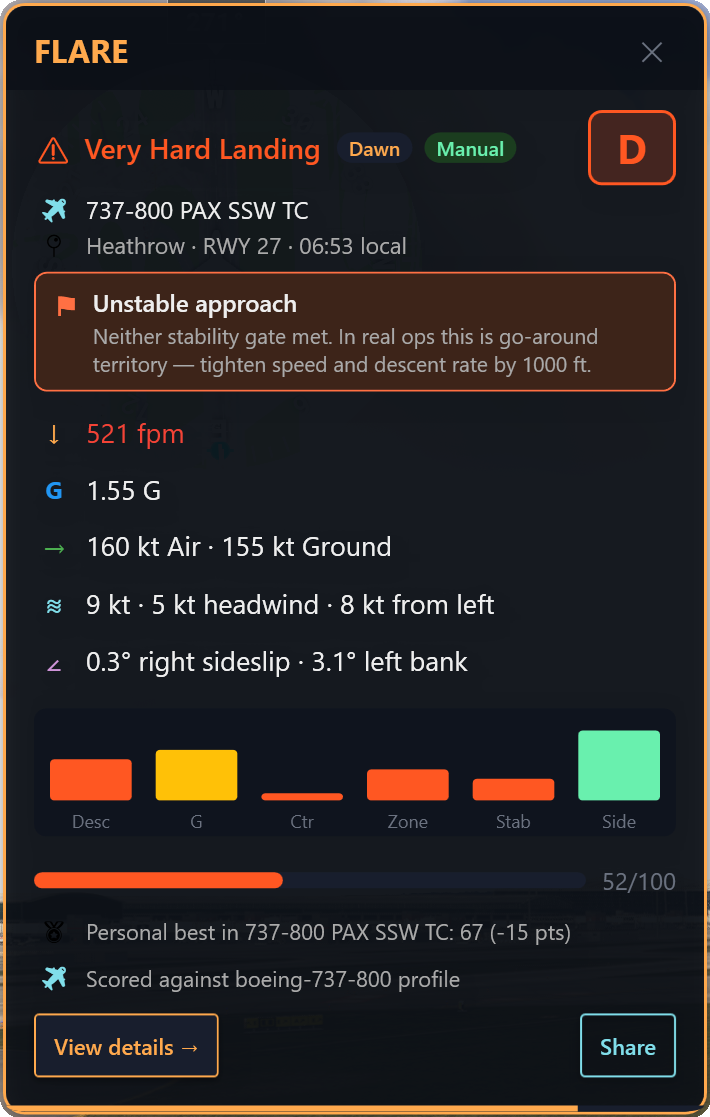
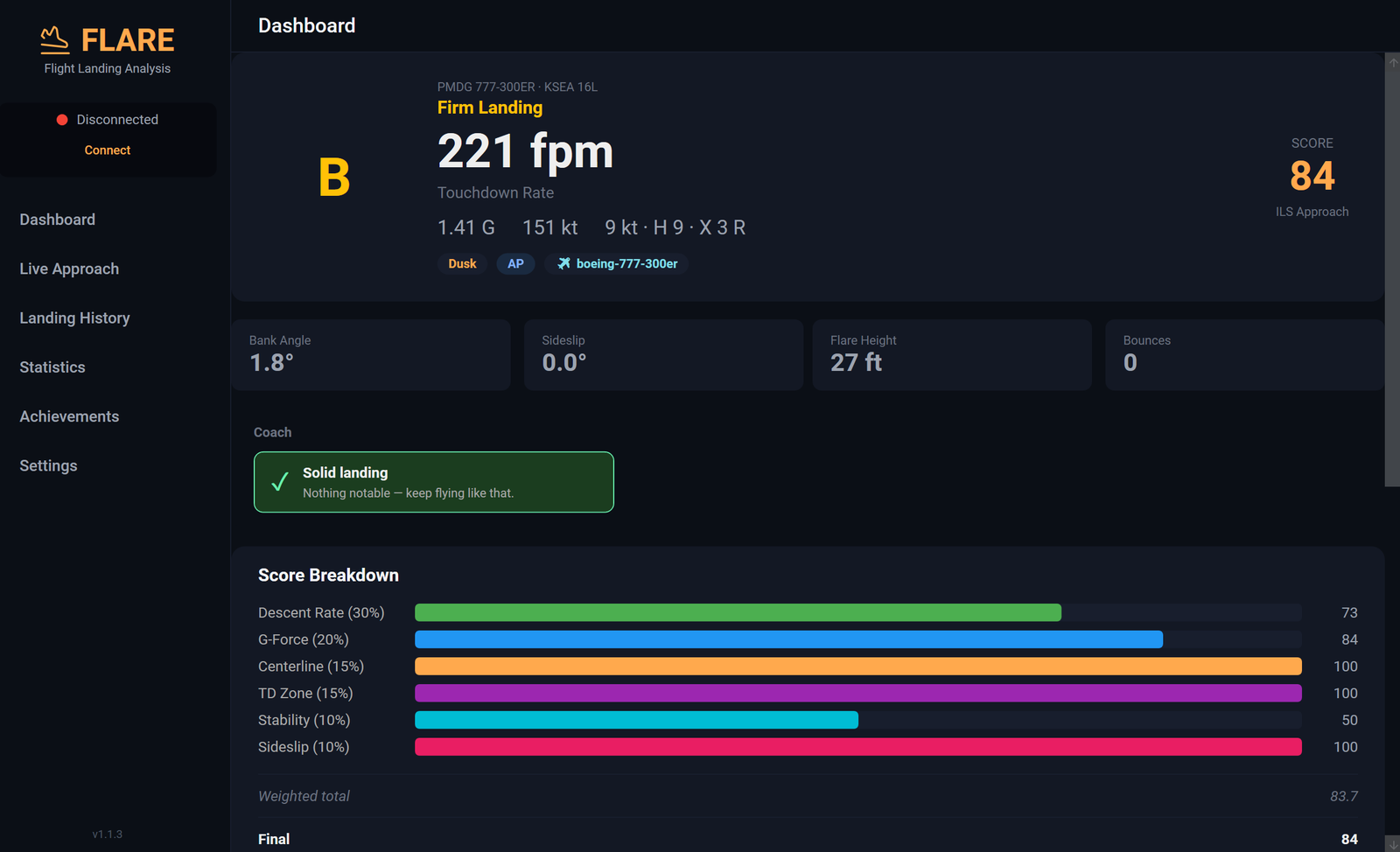
Six sub-scores feed a weighted composite, with two penalties (bounces, tail strike) and one multiplier (crosswind difficulty) shaping the final 0–100 grade. Every threshold is anchored to FAA / EASA / FCOM sources, traceable in the help guide.
Final formula: clamp((Σ component×weight − bounce − tail-strike) × wind-factor, 0, 100). See the full breakdown →
04 · AIRCRAFT PROFILES
A 737 isn't graded like a Cessna.
FLARE ships with per-aircraft scoring profiles for 476 airframes across 66 sub-families and 28 categories — from light GA singles and tailwheels to narrow-bodies, wide-bodies, business jets, fighter jets, warbirds, vintage piston, hot-air balloons, and more. The aircraft title coming from MSFS routes through a four-tier matcher (named profile → sub-family → category → uncategorized) so every flight gets the right curves, with every number verified against manufacturer and FAA data.
Threshold sources: 14 CFR 25.473 (transport-category sink rates), 14 CFR 23.473 (Part 23 GA), Boeing AMM Ch. 5-51 hard-landing inspection criteria, Airbus FCOM landing techniques, FAA AIM 5-4-7 (Vref categories). Browse the full catalog →
05 · LIVE VIEW
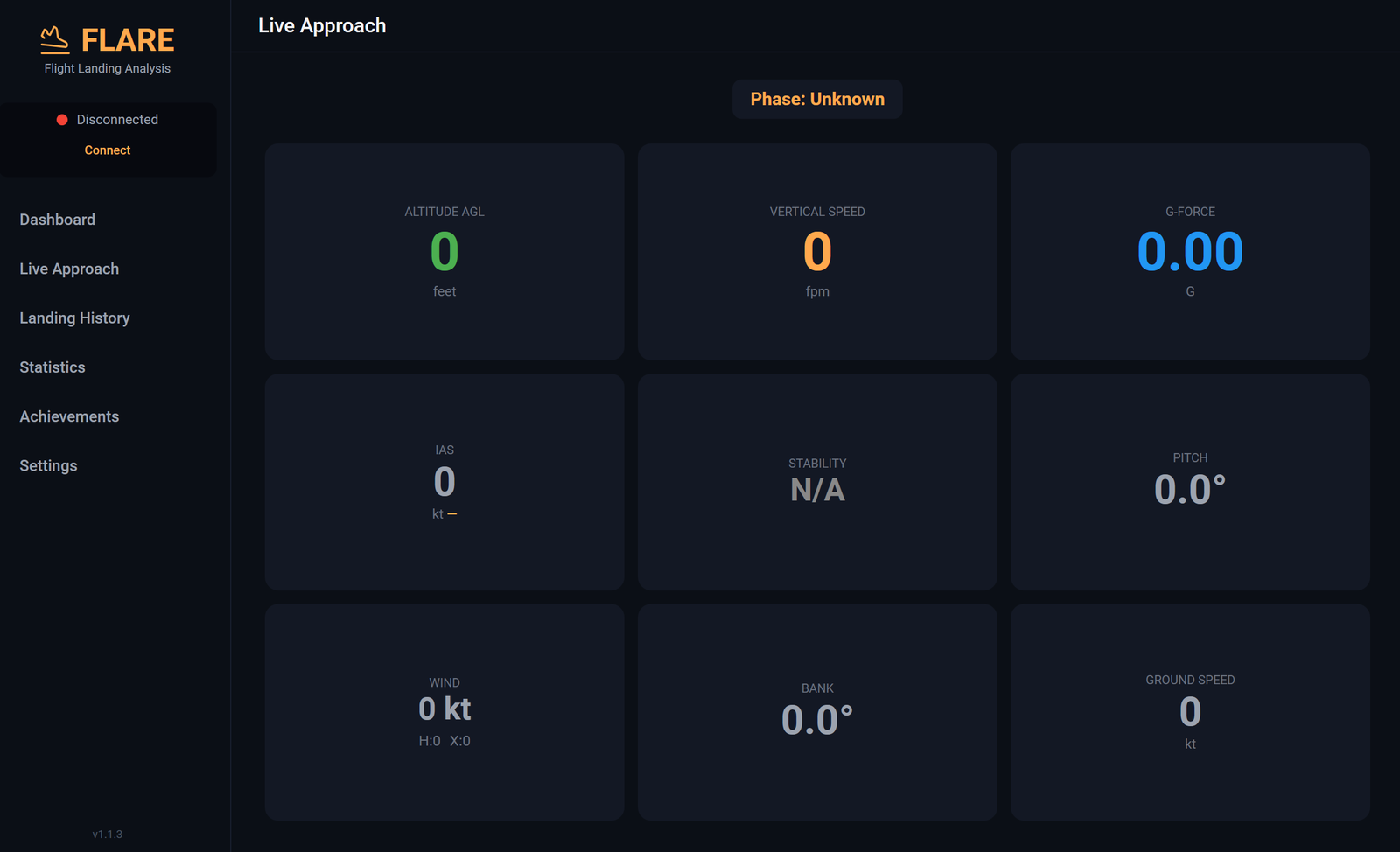
Standalone window. Second-monitor friendly.
A standalone Windows window that doesn't compete with MSFS for cockpit real estate. Park it on a second monitor — or alt-tab when you want it. Your EFB, panels, and views inside the sim stay untouched.
Live data while on final. Full debrief card pops at touchdown — grade, FPM, G, touchdown-zone position — and stays open through rollout. No Community-folder add-ons, no Marketplace install, nothing loaded inside the sim.
06 · LOCAL LOGBOOK
A logbook on your drive.
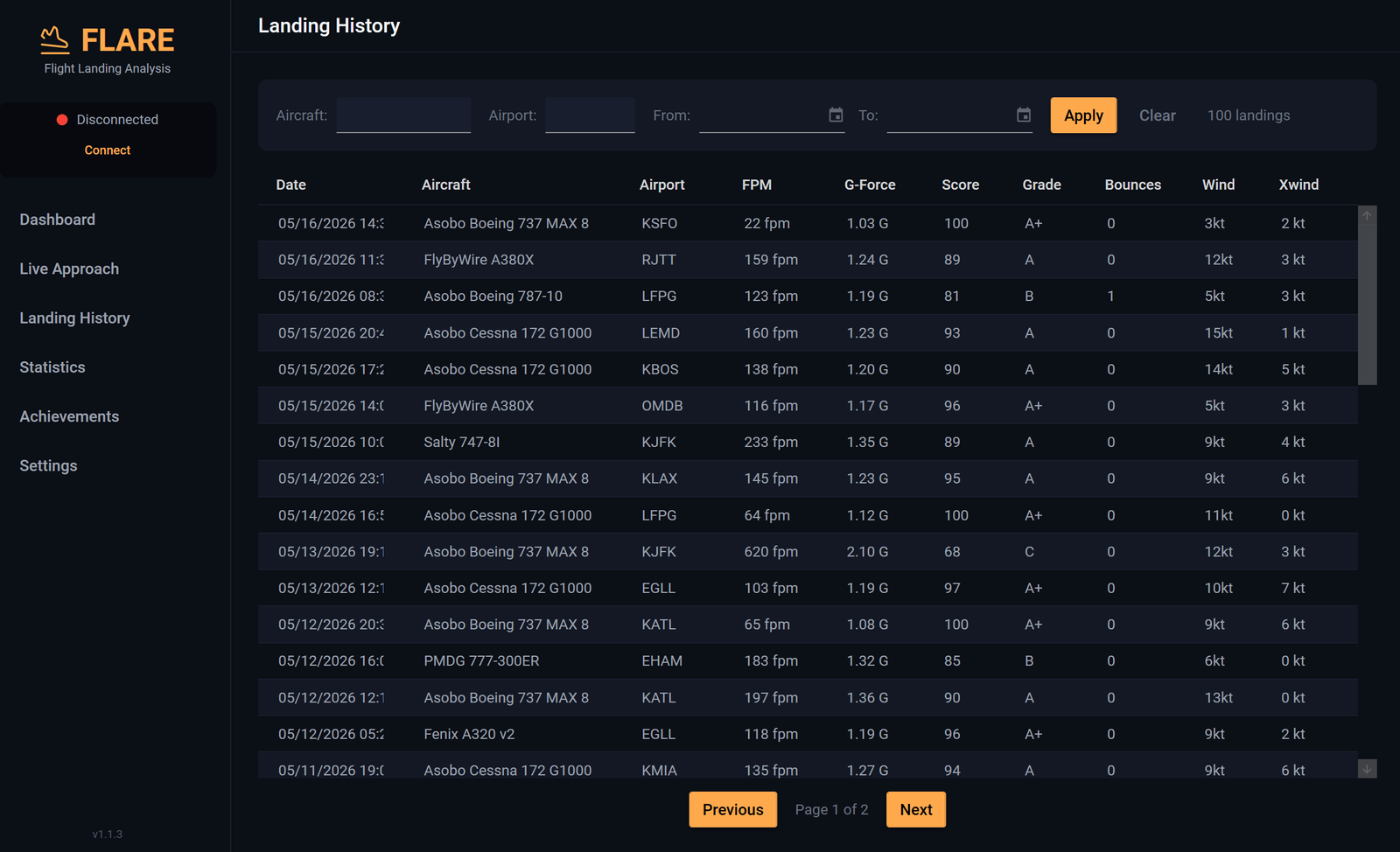
Every touchdown lives in a local SQLite file under %LOCALAPPDATA%\FLARE. Sort, filter, and search by aircraft, airport, grade, or date range. Export the current selection to CSV or JSON in one click.
The local copy is the source of truth. It works fully offline. Uninstalling FLARE doesn't touch it. It's yours.
FLARE.exe
SQLite · local
flaresim.io
your portal
Direction
desktop → server
Toggle
on / off · 1 click
Reuse
never for AI / ads
07 · CLOUD SYNC
Optional. Reversible. Yours.
When you're signed in, each landing is uploaded to your private customer portal so the web surfaces — statistics, achievements, leaderboards, debrief — can read it. The sync is one-way (desktop → server) and pushes one batch per landing.
Toggle it off in Portal → Settings → Account and uploads stop on the next request. Your local SQLite is unaffected. We never reuse your landings for marketing or AI training.
08 · CUSTOMER PORTAL
A second brain for your hours.
A complete web view of your synced landings. Filter and drill into individual flights, see full sub-score breakdowns, compare aircraft and airports, watch your trend lines move month over month.
Statistics include A+ percentage over time, grade distribution, top aircraft and airports, monthly activity, average vertical speed and G-force, stability-gate distribution, and bounce events.
A+ this month
42%
▲ +6 vs last
Avg FPM
-148
last 30 days
Stable @300
88%
SOP gate
A+ percentage · 6 months
↑ trending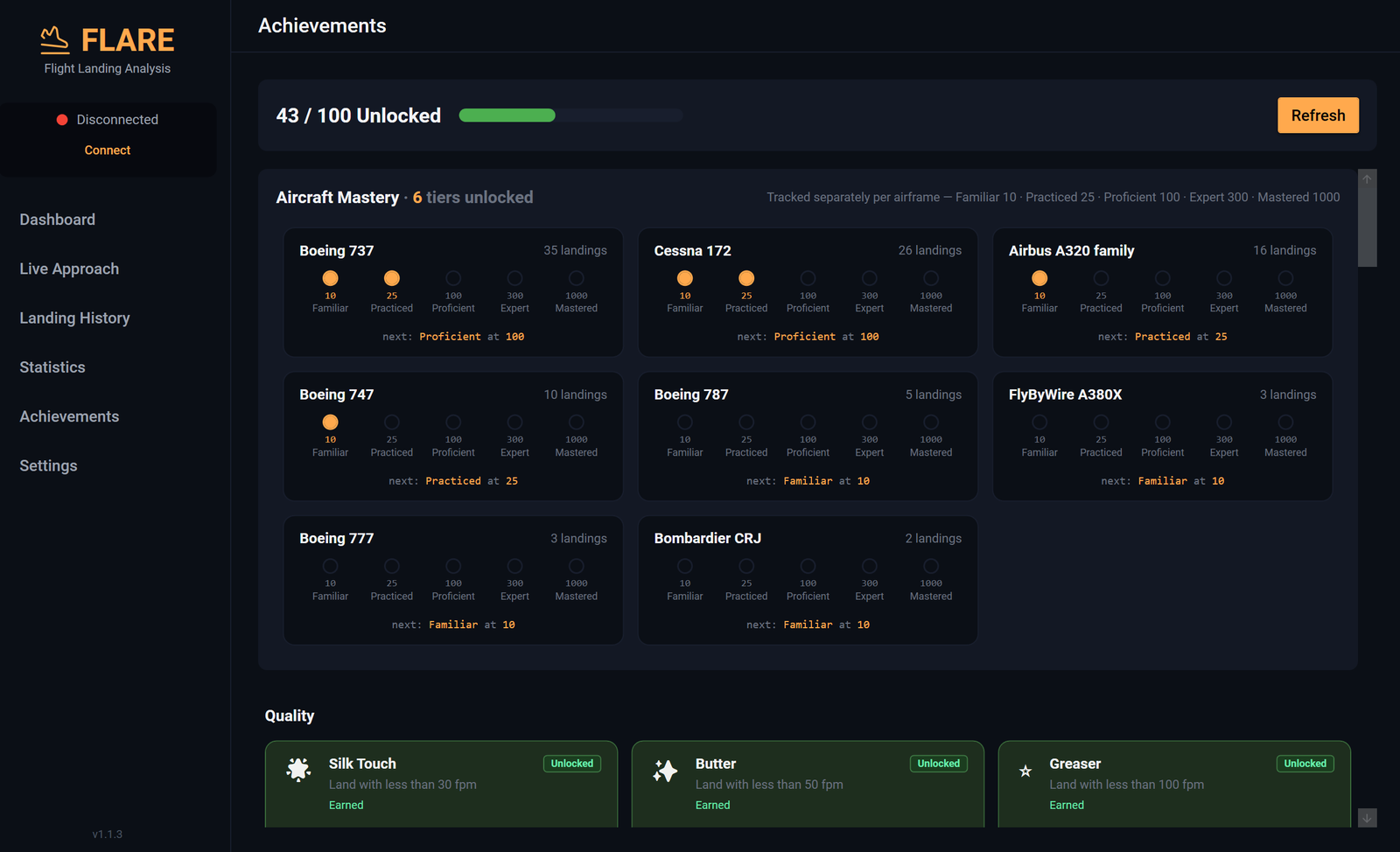
09 · ACHIEVEMENTS
Earn it on the airframe.
Static achievements span ten themed categories — Quality (first A+, ten butter landings), Weather (crosswinds, low-vis), Consistency (stable-approach streaks), Exploration (different aircraft and airports), Airports (demanding fields), plus Milestones, Technique, Procedures, Special, and Fun.
Aircraft Mastery is a per-aircraft 5-tier ladder: Familiar at 10 landings, Practiced at 25, Proficient at 100, Expert at 300, Mastered at 1,000. Tracked separately for every airframe you fly.
10 · LEADERBOARDS
Public rankings. Opt-in.
Three boards — global all-time, monthly, and per-aircraft — ranked by A+ percentage with a 10-landing minimum-floor in scope so a single A+ doesn't game the top spot. Boards refresh daily.
Inclusion is opt-in twice over: claim a public handle, turn your profile public, then enable "show me on the leaderboards". Toggle off and you disappear from the next refresh. Your public profile lives at /p/<handle>/.
| # | Pilot | A+ % |
|---|---|---|
| 1 | @captain_smooth | 68% |
| 2 | @buttermaker | 61% |
| 3 | @you | 54% |
| 4 | @stabilizedat500 | 49% |
Reviewer
@captain_smooth
Student
@you
Nice flare timing here. You held off about half a second longer than usual — try the same approach with the autobrake set to 2 next time.
— @captain_smooth · 12 min ago
Read-only access · expires when session closes
11 · DEBRIEF
A reviewer in your cockpit.
Invite a flight instructor or experienced peer to review your landings. While the session is active they get read-only access to your synced flights, can leave per-landing comments, and exchange messages in a session thread.
Either side closes the session at any time. Read access ends immediately; the thread and comments are preserved as an audit record. Each session is one reviewer to one student — your data stays bounded.
12 · LICENSE
Two devices. Self-serve everything.
A single license covers two concurrently activated devices. Move between PCs by deactivating an old seat from the desktop app or from the portal. Hit the cap during activation? FLARE shows a picker on the spot.
Regenerate your key (twice per calendar month) if it leaks. Submit a transfer request to gift it to someone else. Every action lives in your portal — no support ticket, no waiting.
Seats
2 / 2
DESKTOP-RIG
Last seen · 2h ago
LAPTOP-OFFICE
Last seen · 6 days ago
13 · ACCOUNT & SECURITY
Account hygiene, first-class.
TOTP two-factor with one-time recovery codes. Passkeys (FIDO2) on every account. Active-session inspection with one-click revoke. Email management, notification preferences per category, full data export.
Account deletion is one click — and it actually deletes. License records detach, personal data is erased, your local logbook on your PC is untouched.
Try it on your next flight.
$19.99, one-time. Lifetime updates. 14-day refund.